 At the heart of every online business lies a crucial need: trust. Trust from customers, partners and the owner himself. In an age where cyber threats are constantly evolving, it is essential for businesses to build a line of defense not only to protect themselves, but also to maintain the trust of their customers. This is made easy by Trust Guard’s dashboard.
With this in mind, Trust Guard has an innovative dashboard that gives business owners and managers, as well as system administrators, hosting parties and system auditors, the flexibility to view the security results of their online activities in a way that suits them best. Whether you prefer a cursory overview or a deep dive into the technical details, Trust Guard’s dashboard provides the tools to meet these needs.
Results at expert level
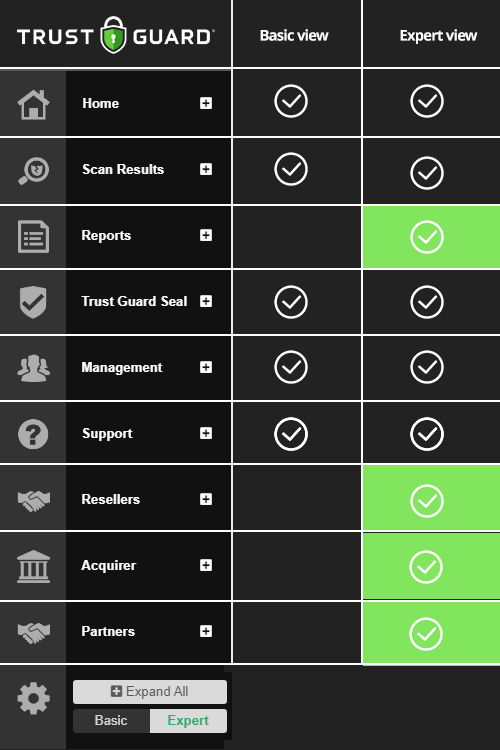
For those who like to keep a firm grip, the Expert View offers a depth of analysis and insight. With a few clicks, managers and system administrators can gain direct access to a comprehensive overview of scan results from acquirers, partners and resellers. This detailed view allows them to immediately identify potential vulnerabilities and proactively respond to potential threats. But it goes beyond just scan results; it also includes request support, management functions, the Trust Guard trustmark and the ability to download reports.
With the Expert View, managers and system administrators have the power to enhance their online security strategy and protect their digital operations against even the most advanced threats. By providing instant access to critical information, Trust Guard enables them to respond quickly and effectively to any threat that arises.
Results at a simple level
But Trust Guard also understands that not everyone needs an in-depth technical overview. For those who prefer to see the big picture, there is the Basic view. This simple interface provides an easy-to-read summary of key scan results, allowing small merchant owners and other non-technical users to quickly and easily see how their website is performing in terms of security.
Whether it’s the Expert View for in-depth analysis or the Basic View for a quick check, Trust Guard’s dashboard allows every user to ensure the security of their online activities in a way that suits them best. With this powerful tool at their side, businesses can move forward in the digital age with confidence, knowing their online security is in good hands.